Agentic API (MCP)#
The Agentic API lets AI coding assistants — such as Claude Code, Cursor, or GitHub Copilot in VS Code — use your Stb-tester portal. It is an MCP (Model Context Protocol) server hosted by the Stb-tester Portal that exposes a set of tools the assistant can call. This allows the assistant to do a better job of writing Stb-tester test cases and Page Objects, because it can run its code against your real devices and see what happens.
The most important of these tools run your Page Object code against real frames
captured from your devices and report back what each property evaluated to —
including images of the intermediate image-processing steps. This closes the
loop that makes AI assistants useful for Stb-tester development: instead of
guessing at stbt.ocr and stbt.match calls it can’t verify, the assistant
writes a Page Object, runs it against your Object Repository, looks at the result, and fixes it — before handing it to
you.
The MCP server lives at a single portal-wide endpoint:
https://company.stb-tester.com/api/v2/mcp
It implements the MCP “Streamable HTTP” transport (JSON-RPC 2.0 over HTTP POST). Any MCP-capable client can connect to it.
Setting it up#
There are two things to configure: the connection to the MCP server (URL and authentication), and the coding conventions that tell the assistant how to write Stb-tester Page Objects.
1. Generate an access token#
Authentication uses the same access tokens as the REST API. Log into the Stb-tester Portal using your browser, click on the user menu in the top right corner, and select “Generate new access token”. You can revoke access tokens from the same menu.
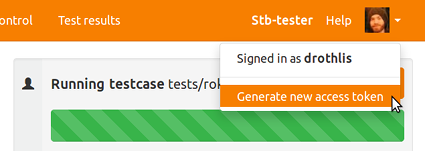
The token is sent in the Authorization HTTP header of every request, in the
form token <your-token>. The endpoint requires “push” permission to your
test-pack, so everything the assistant does runs as you — see
User Access Control.
2. Configure your assistant#
Each MCP client has its own configuration file and format, but they all connect
to the same URL with the same Authorization: token <your-token> header.
VS Code (GitHub Copilot)#
Running stbt_rig setup --vscode writes an .vscode/mcp.json that configures
VS Code’s MCP client for you (see stbt_rig Command-Line Tool and VS Code):
python3 stbt_rig.py setup --vscode
VS Code prompts you for the access token the first time it connects and stores it securely. The generated configuration looks like this:
{
    "servers": {
        "stb-tester-portal": {
            "type": "http",
            "url": "https://company.stb-tester.com/api/v2/mcp",
            "headers": {
                "Authorization": "token ${input:stbt-auth-token}"
            }
        }
    },
    "inputs": [
        {
            "type": "promptString",
            "id": "stbt-auth-token",
            "description": "Stb-tester REST API access token",
            "password": true
        }
    ]
}
Claude Code#
Claude Code does not read .vscode/mcp.json; it uses its own .mcp.json file
at the root of the test-pack. Add the server from the command line:
claude mcp add --scope project --transport http stb-tester-portal \
    https://company.stb-tester.com/api/v2/mcp \
    --header 'Authorization: token ${STBT_AUTH_TOKEN}'
Note the single quotes: they stop your shell from expanding
${STBT_AUTH_TOKEN}, so the literal string is written into .mcp.json and
Claude Code expands it from the environment each time it starts. (With double
quotes the shell would expand it immediately and bake your real token into the
committed file.) You therefore need STBT_AUTH_TOKEN set in your environment
whenever you run Claude Code.
--scope project writes .mcp.json so the server is shared with everyone who
clones the test-pack; omit it to keep the configuration private to you. The
resulting file looks like this:
{
    "mcpServers": {
        "stb-tester-portal": {
            "type": "http",
            "url": "https://company.stb-tester.com/api/v2/mcp",
            "headers": {
                "Authorization": "token ${STBT_AUTH_TOKEN}"
            }
        }
    }
}
Other MCP clients#
Configure an HTTP (Streamable HTTP) MCP server pointing at the same URL, with
the Authorization: token <your-token> header.
3. Teach the assistant your conventions#
New test-packs include an AGENTS.md file at the root of the repository. This
documents the Stb-tester Page Object conventions for the assistant and, crucially,
instructs it to verify its work against real frames using the MCP tools before
considering a Page Object finished. Most coding assistants read AGENTS.md
automatically. If your test-pack predates this file, we will raise a pull
request against your test-pack to add it for you.
Features#
The Agentic API is organised around the Stb-tester features it makes available to your assistant. Today that is the Object Repository, for developing and debugging Page Objects. Over time we will add more features to the Agentic API, expanding what your assistant can do.
Object Repository#
The Object Repository lets your assistant develop and debug your Page Objects against real frames captured from your devices, instead of guessing at code it can’t verify. Using it, the assistant can:
Run a Page Object against a captured screenshot and read back the evaluated value of each of its properties — including whether
is_visible(and therefore the object’s truthiness) came out true or false. This is how it checks its own code.List the screenshots available to run against, so it tests against real frames from your Object Repository rather than inventing filenames.
Produce a detailed debug report for a single property that is returning the wrong value. The report breaks down every
stbtAPI call made while evaluating the property, including images of the intermediate image-processing steps. Because the assistant can look at those images, it can see that — for example — an OCR region was positioned slightly off, or a colour match caught the wrong element, and fix the underlying problem.
To pick a device to run against, the assistant can also list the Stb-tester Nodes in your test farm and look up each one’s configuration and status.
The development loop#
Put together, the assistant follows this loop when you ask it to write or fix a Page Object:
Write (or edit) the Page Object class, following the conventions in
AGENTS.md.Run the Page Object against real screenshots and check that every property returns the expected value.
If a property is wrong, inspect the detailed debug report — including the intermediate images — and fix the code.
Repeat until the output is correct on every frame.
The result is a Page Object that has already been verified against your real devices, rather than plausible-looking code for you to debug by hand.
Security and privacy#
The Agentic API is “bring your own agent”. You choose which AI coding assistant to use and where it runs — on your own PC, under your control. Because you bring the agent, you can pair it with a privately-hosted AI model — self-hosted or in your own private cloud — so that no code or data need leave your control at all. Stb-tester’s role is limited to hosting the MCP server: it responds to the tool calls your assistant makes, running your Page Objects on your devices and returning the results.
In particular:
We don’t run agents or LLMs. There is no “Stb-tester AI” acting on your behalf, and Stb-tester never sends anything to a third-party AI model. All of the agentic intelligence comes from the assistant you bring; the Portal only executes the specific tool calls it receives.
We don’t send your test code to third-parties. Stb-tester never passes your test-pack, Page Objects, screenshots or any other code to a third-party AI service. Your assistant reads your code locally, and what it forwards to its own AI provider is governed entirely by your choice of assistant and your agreement with that provider — not by Stb-tester.
Everything runs as you. The MCP server authenticates with your access token and requires “push” permission, the same as the REST API. Your assistant can only do things that you could do yourself, and its actions are attributed to you. Revoke the token at any time to cut off access. See User Access Control.
To use the Agentic API today you must have write (“push”) access to your test-pack git repository. In the future we may let users with manual-control-only access connect an agent as well — but, as above, the agent will never be able to do anything that the user couldn’t do themselves.
See also#
Object Repository — the Object Repository and Page Objects.
HTTP REST API v2 — the HTTP REST API, which shares the same authentication.
stbt_rig Command-Line Tool — the
stbt_rig.pyhelper, includingsetupandsnapshot.User Access Control — access tokens and permissions.